Real-time analytics for every link and install
WarpLink shows recent taps and installs within minutes, from the same SDK as deep linking and attribution.
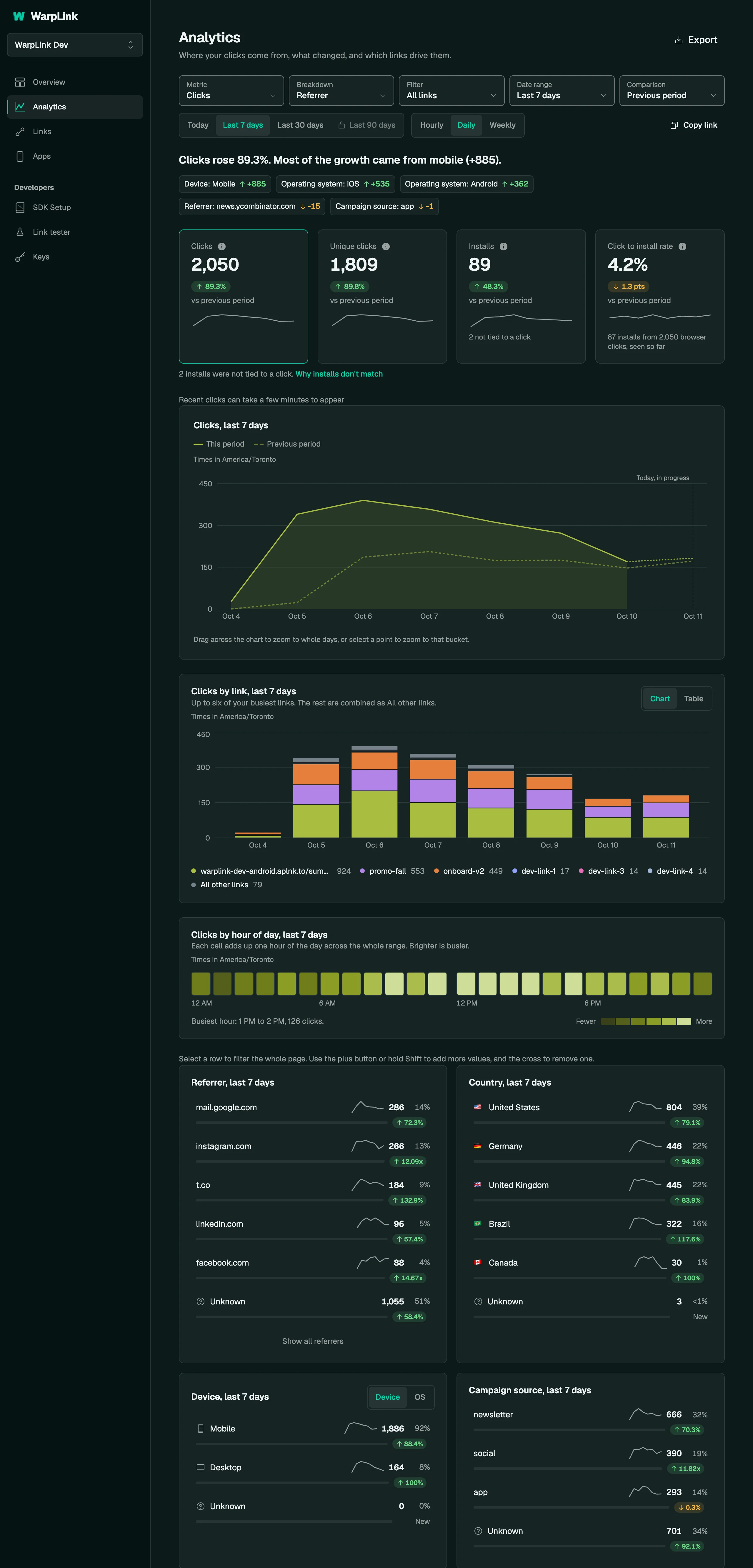
What is real-time link analytics?
Real-time link analytics records every click on a link, and every install attributed to it, then shows them in the dashboard per link and per campaign, broken down by device, country, referrer, and UTM parameters. Deep linking, install attribution, and real-time analytics come from the same SDK, so installs appear beside the clicks that earned them and the numbers are one system rather than three vendors you reconcile by hand.
How it works
- Recent taps show in the dashboard within minutes.
- A known bot, such as a social media crawler, gets a preview page and never becomes a click.
- Clicks are queued and written in batches, so counting never delays the visitor.
- GET /v1/analytics, CSV exports, and the MCP server return what the page shows for the same window, filters, and reporting time zone.
- The retention window moves with time, so older clicks fall out of it.
- The MCP server exposes 47 tools, is free on every plan, and shares the REST API limit of 60 requests a minute.
How real-time link analytics works
Share
Create a link and share it. Every tap is counted at the edge, whether it opened your app, went on to the store, or landed on your website. Uniqueness is computed when the click is written, per link, address, and 24-hour window, so one curious reader tapping four times is still one unique click.
Watch
Every click is recorded at tap time, and recent taps show in the dashboard within minutes. Totals, unique clicks, and the trend over time sit beside the installs that attribution credited back to the same link, with hourly, daily, and weekly buckets and the previous period drawn alongside.
Break it down
Break the same clicks down by device, country, referrer, and UTM parameters, per link and per campaign. Filter by several values, compare links, and read days in your organization's time zone. The REST API and MCP server return the same numbers as the dashboard.
From an AI client
{
  "tool": "get_link_analytics",
  "input": {
    "link_id": "3f9a1c2e-6b7d-4e1a-9c2f-8a5b1d0e7c44",
    "days": 7
  },
  "output": {
    "total_clicks": 1842,
    "unique_clicks": 1290,
    "time_series": [
      { "date": "2026-09-15", "total": 240, "unique": 178 },
      { "date": "2026-09-16", "total": 265, "unique": 191 }
    ],
    "sources": [
      { "source": "app_open", "total": 322, "unique": 210 },
      { "source": "redirect", "total": 1520, "unique": 1080 }
    ]
  }
}
{
"mcpServers": {
"warplink": {
"url": "https://api.warplink.app/mcp"
}
}
}Specifications
- Breakdowns
- Country, referrer, device, operating system, browser, campaign source, app, and tap source.
- Referral links
- Filter analytics to referral links with source=referrals, and list them with GET /v1/links?is_referral=true.
- Date ranges
- Today, 7, 30, and 90 days, or a custom range.
- Retention
- 90 days on Free, 180 days on Starter, 1 year on Growth, 3 years on Scale, 3 years on Unlimited. Free reads the last 30 days of its 90; an upgrade shows the rest at once.
- Free plan limit
- Passing the monthly click limit freezes analytics at that moment, never the links, and the dashboard warns you well before you get there. Paid plans are never frozen.
- Redirects
- Redirects keep working past any click limit, on every plan. A custom domain serves while your plan includes it: Free includes a 90-day trial (about 3 months), with a grace period of up to 30 days after a paid plan ends.
- Plans
- Free includes every feature. Plans start at Free ($0, 10K clicks a month) and run through Starter ($19), Growth ($49), and Scale ($99) to Unlimited ($149, no click ceiling).
- Sub-10ms redirects
- 300+ edge nodes
- Never blocked
- MCP server, free on all plans
300+ is the edge network's published node count. How we measure sub-10ms.
Common questions
How fast do clicks appear?
Clicks are recorded at tap time, and recent taps show in the dashboard within minutes. The redirect is answered at the edge and the click is recorded on a separate path, so counting never delays the person tapping the link. That is what lets you post a link, watch the first taps arrive, and decide whether the message landed while it is still worth changing.
Can I see clicks by UTM source and campaign?
Yes. The utm_source, utm_medium, and utm_campaign values on the link a visitor tapped are stored with the click, so clicks group by source, medium, and campaign the same way the rest of your reporting does. Device, country, and referrer work the same way, per link and per campaign, which is what tells you that a channel brought clicks but a different one brought installs.
Can I export the numbers?
Yes, in three ways. The dashboard exports your clicks as CSV, so the numbers move into a spreadsheet or a warehouse without a script. The REST API has export routes that start a click export, report its status, and download the file, and GET /v1/analytics returns the same numbers as the Analytics page. An AI client can do both over the MCP server, which is free on every plan, needs the analytics:read or links:read scope, and shares the REST API limit of 60 requests a minute.
The link layer your app is missing.
Set up deep linking, attribution, and analytics in minutes. Free to start.
Have a question?